Directional inputs
Higher timeframe EMAs, structure and daily references contribute to the bias display.

Direction & Bias / TRADINGVIEW
Bring the day’s context into one view.
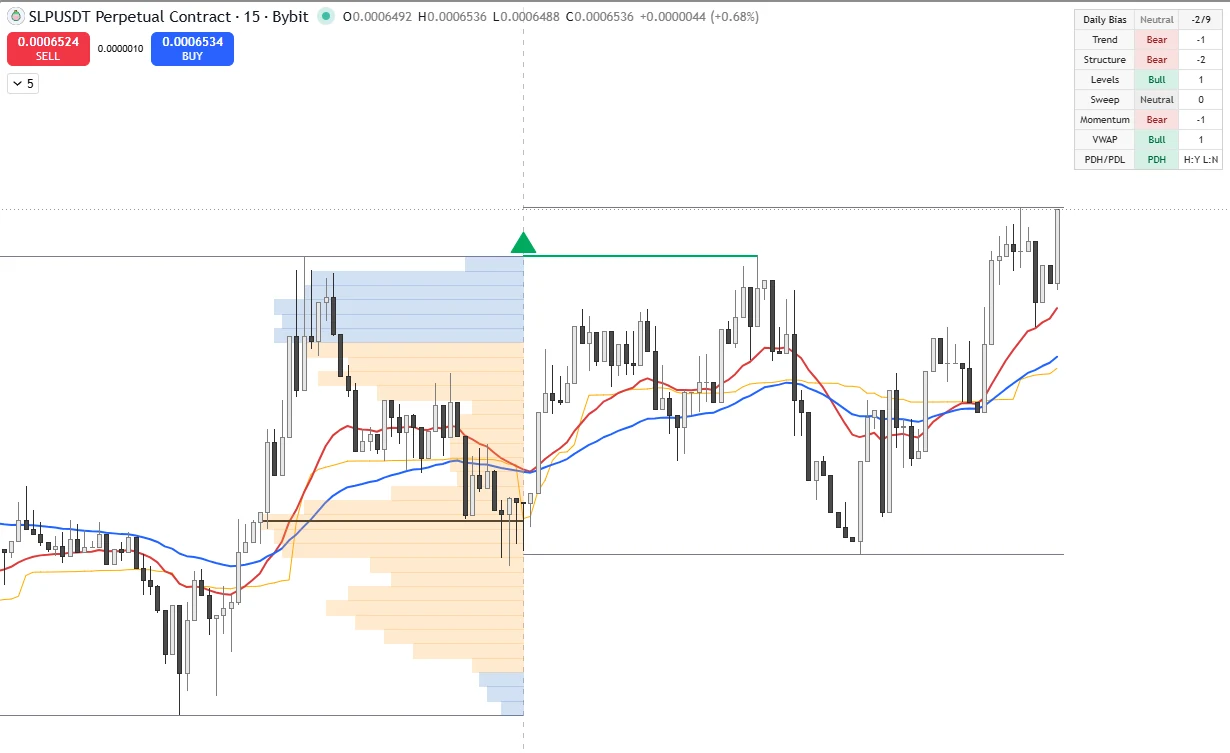
Combine daily directional context with a previous-day volume profile approximation. A compact dashboard brings together higher timeframe trend, market structure, session references and intraday filters.
FROM PRICE TO INFORMATION
Higher timeframe EMAs, structure and daily references contribute to the bias display.
A previous-day profile approximation highlights a point of control and value area.
VWAP, daily extremes and previous-day breaks keep the current session in perspective.
ON THE CHART
Original product examples. Open a chart to inspect it at full size.
Historical examples illustrate the display, not a trading result. Indicator settings and chart data affect what you see.
CORE FEATURES
HOW TRADERS CAN USE IT
Review the dashboard with the previous-day profile and current price structure. Treat the score as contextual information. The profile is an approximation, not a direct view of exchange order flow.
Designed for intraday analysis with higher timeframe and previous-day context.
View the setup guideFROM PURCHASE TO CHART
Review the indicator and confirm the purchase details on its access page.
After your purchase is confirmed, email us your TradingView username.
We activate your invite-only access manually, usually within 24 hours.
Find the tool under Invite-only scripts and add it to your chart.
LIFETIME INDICATOR ACCESS
One-time purchase. Lifetime invite-only access and future updates.
You need a TradingView account. These are invite-only indicators used directly in TradingView. Your TradingView plan determines your platform limits and available chart features.
For Malaysian SNR Levels, enter your TradingView username during checkout. For purchases arranged by email, include your username with your order. Access is granted manually to that account, usually within 24 hours after payment is confirmed and we have your username.
The indicator catalogue offers a one-time payment with lifetime access and future updates.
After activation, open Indicators in TradingView and look under Invite-only scripts. Make sure you are signed into the account whose username you supplied. Contact us if access is missing.
Start with your analysis problem: Malaysian SNR for structural levels, Gann Swing for swing structure, or Daily Direction Profile for session context. The bundle combines those three perspectives.
No. They visualize market information and provide analysis context. They do not guarantee profits, predict outcomes or replace your own trading decisions and risk management.
MORE INDICATORS
Support & Resistance
Find fresh levels. Let price come to you.
Market Structure
Separate the main trend from the pullback.